Balanced territories.
Built for local privacy.
An upcoming, self-contained tool for drawing, counting, balancing, and managing congregation field-service territories from real roads, rivers, and building footprints. Designed to run 100% locally on your computer with zero accounts, zero cloud uploads, and direct exports for NW Scheduler and Hourglass. Built by volunteers, for congregations.

In Active Development
See Inside the App →
Inside Territory Builder: Screenshots & Visual Tour
A closer look at the interface, guided workflow, publisher-effort balancing, and boundary tools currently in testing. Click any screenshot to enlarge.
 🔍 Click to enlarge
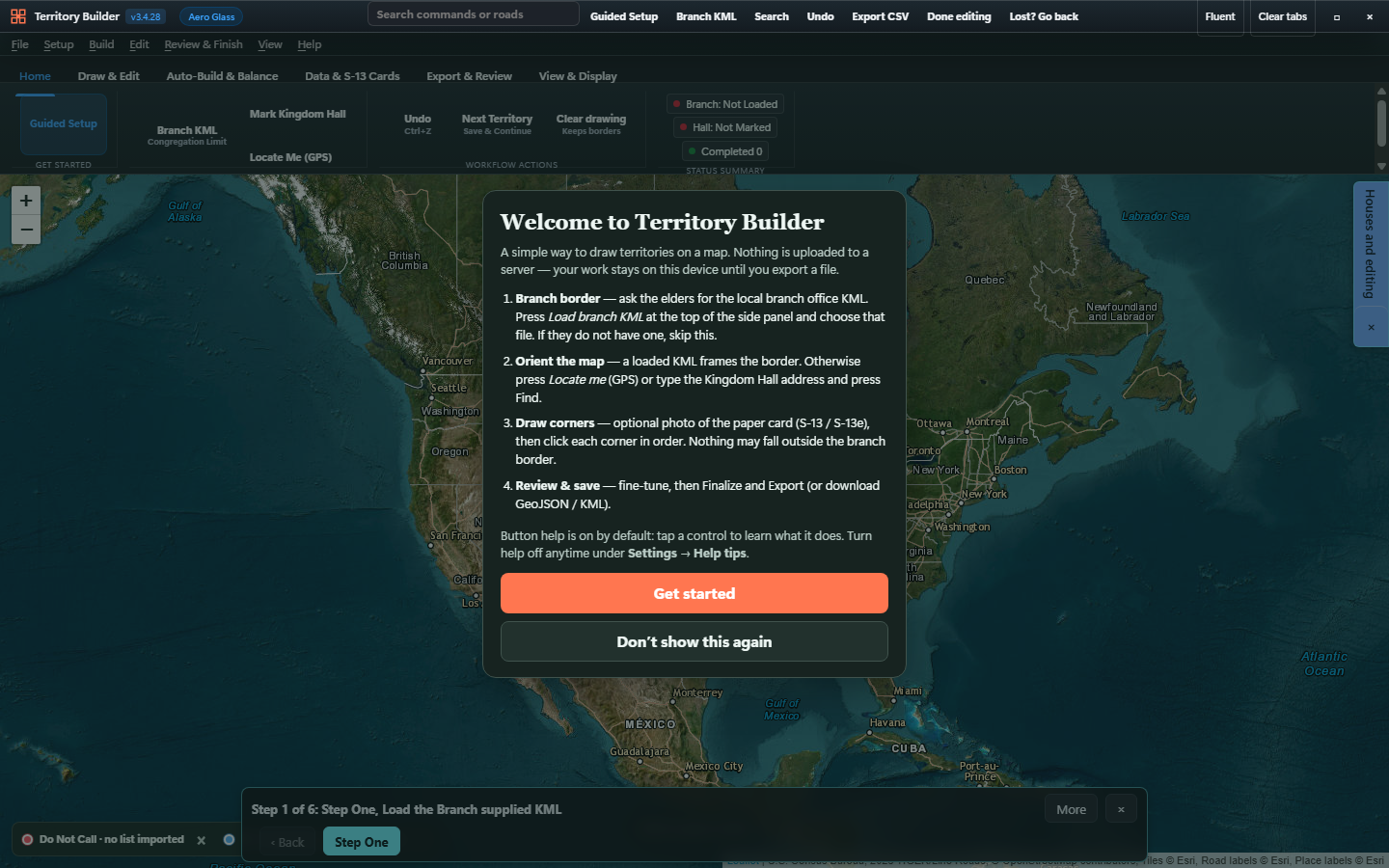
Guided Welcome & 6-Step Bottom Bar
A clean, dark-glass workspace with a clear top ribbon, instant command search, a "Lost? Go back" recovery button, and a persistent 6-step guide along the bottom of the map.
 🔍 Click to enlarge
Publisher-Hours Effort Balancing
Balances territories not just by raw house count, but by estimated publisher-hours—accounting for walking clusters, long rural driveways, steep ground, rivers, and travel from the Kingdom Hall.
 🔍 Click to enlarge
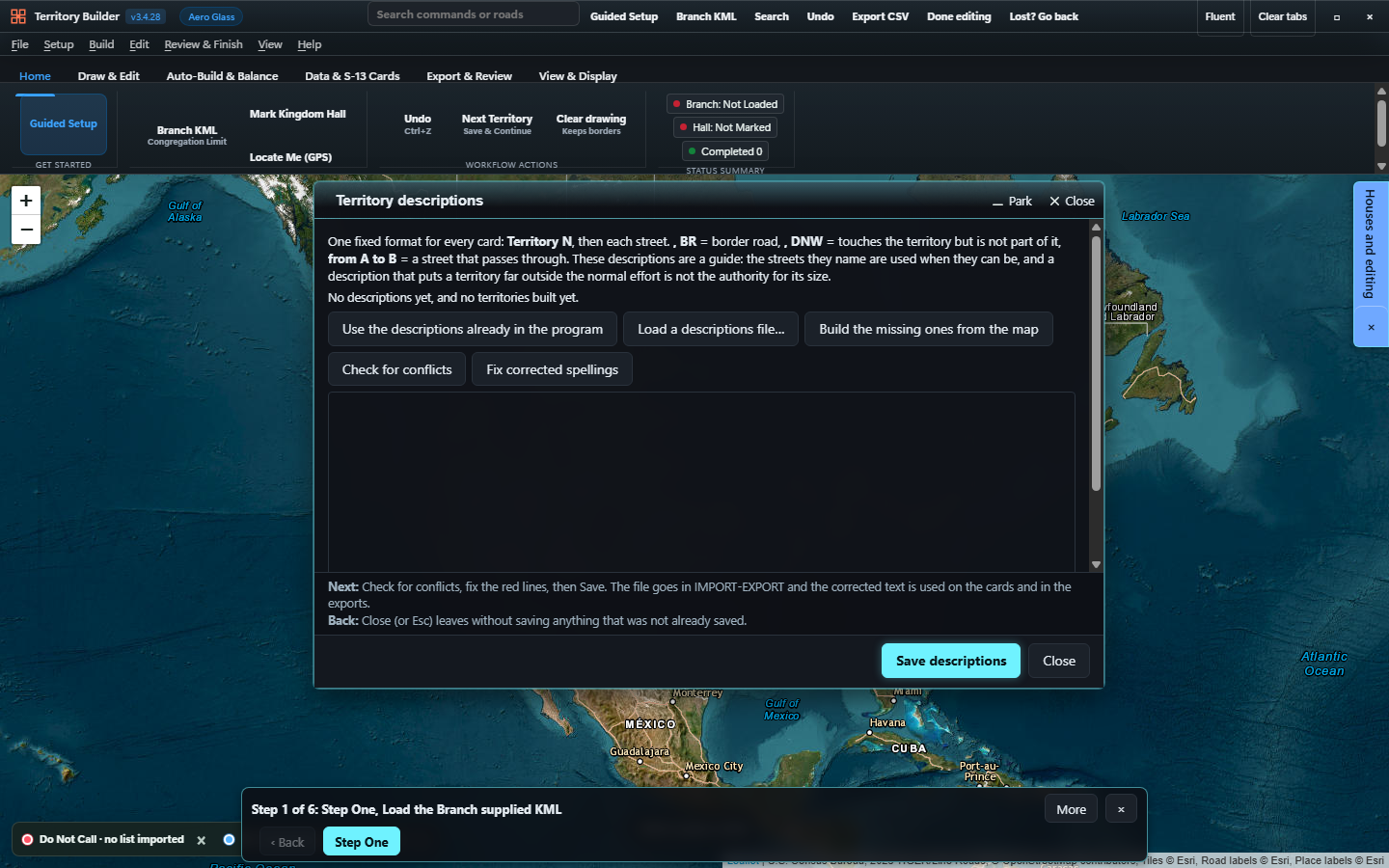
Typed Descriptions & Conflict Checking
Build or load written street boundary descriptions, highlight named streets right on the map, check for conflicts against drawn territory borders, and fix street-name typos in one click.
 🔍 Click to enlarge
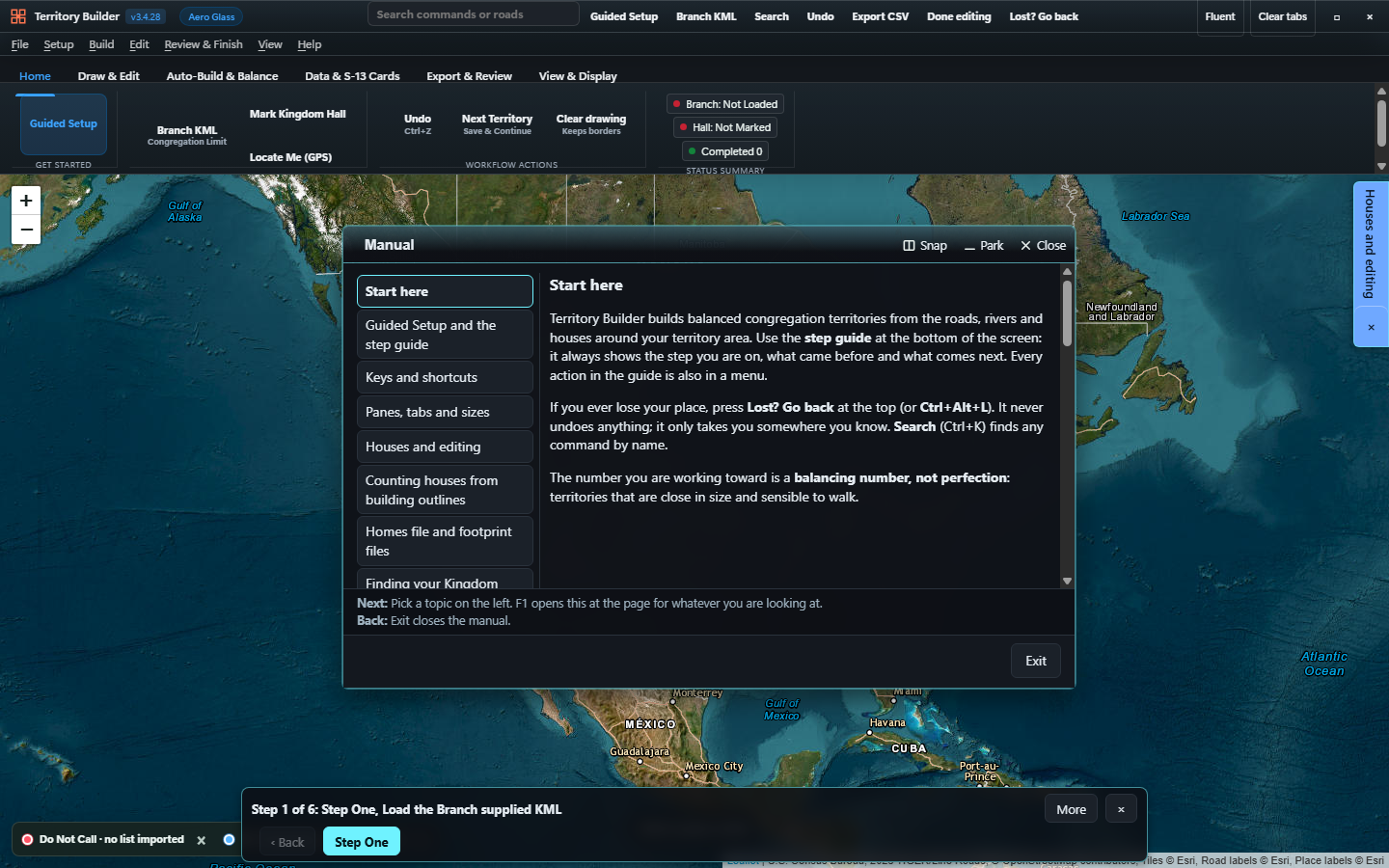
Context-Aware Interactive Manual (F1)
Pressing F1 anywhere in the program opens the built-in manual directly to the topic for the window you are viewing—written in plain, non-technical language.
How the Pieces Fit Together
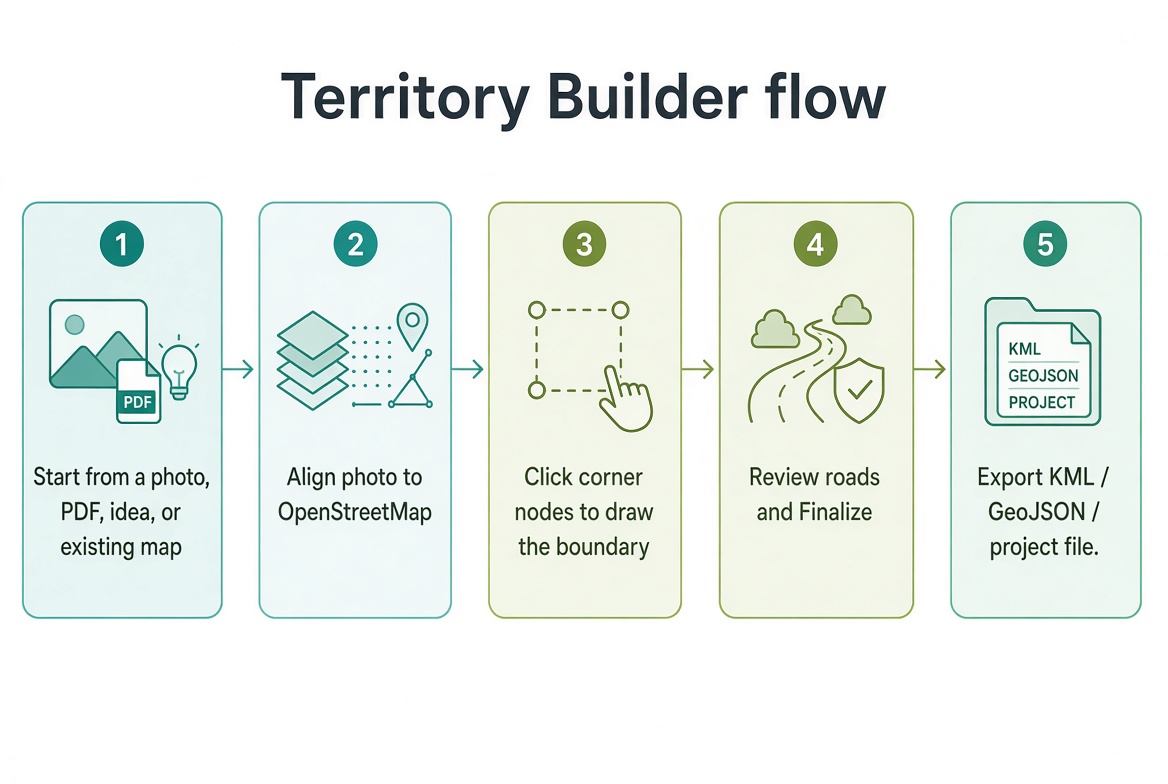
Visualizing the workflow from paper S-13 cards and OpenStreetMap data to finished exports.
 🔍 Enlarge
End-to-End Workflow
From an existing map, PDF, or photo to aligned boundaries, road verification, and ready-to-import KML/GeoJSON files.
 🔍 Enlarge
Four Ways to Start
Start from a smartphone photo of an S-13 card, a scanned PDF sketch, a full congregation map, or draw fresh from the road network.
 🔍 Enlarge
Paper Card Alignment
Overlay a faded paper territory card onto OpenStreetMap and match corners using visible landmarks—no real addresses needed.
 🔍 Enlarge
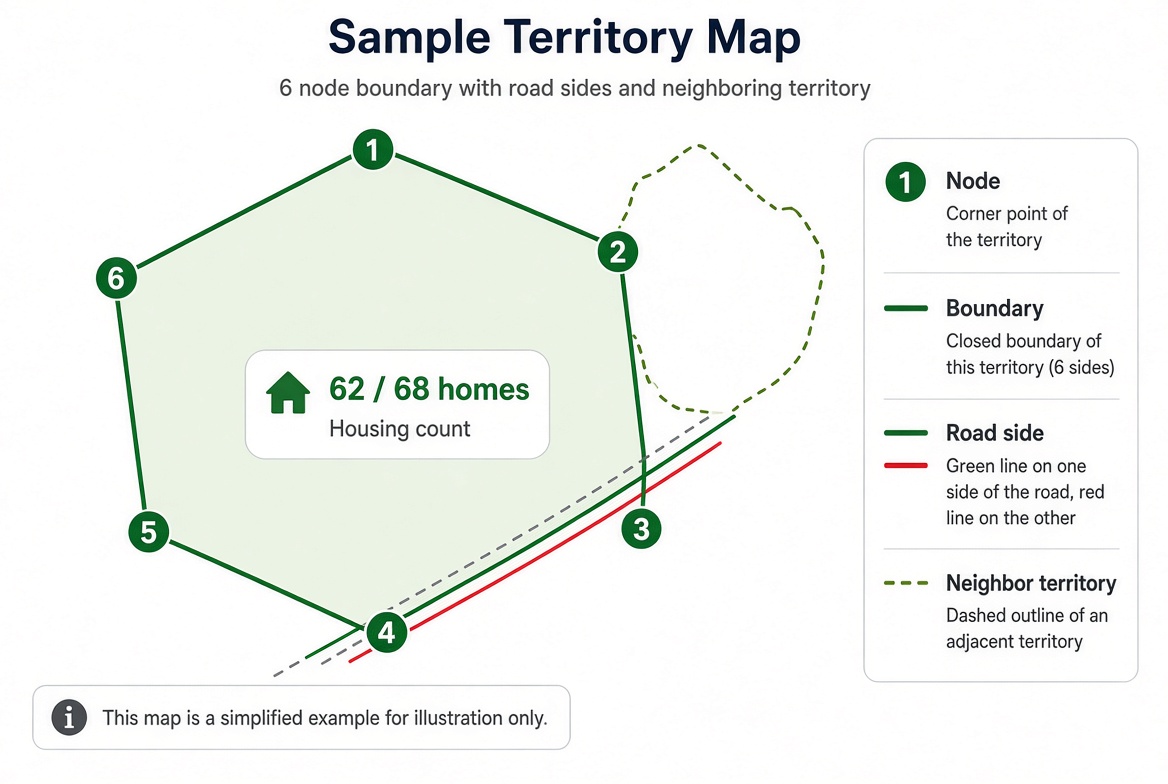
Clear Road-Side Boundaries
Clearly distinguishes included road sides, excluded sides across the street, housing counts, and adjacent neighbor territories.
 🔍 Enlarge
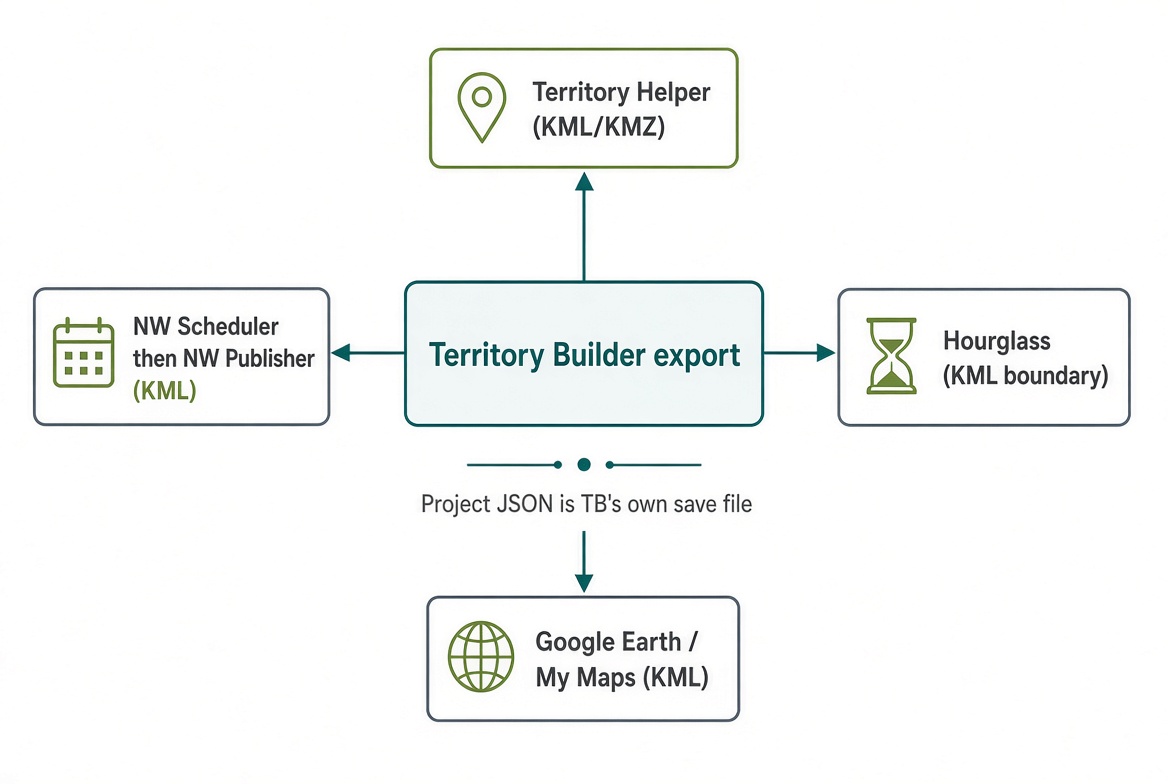
Compatible Exports
Exports directly to NW Scheduler (and NW Publisher), Hourglass, Territory Helper KML/KMZ, and Google Earth.
Guided Setup in 6 Clear Steps
Designed for territory servants of every technical comfort level. The bottom step guide always shows where you are, what came before, and what comes next.
Branch Border
Load your congregation's assigned boundary from a KML, KMZ, or GeoJSON file—or trace and save it directly on the interactive map.
Kingdom Hall Location
Pick your Kingdom Hall from the nearest detected locations or tap the building on the map to anchor travel-distance calculations.
Roads, Rivers & Houses
Fetch road networks, river boundaries, and building outlines automatically from OpenStreetMap & U.S. Census data, or merge county/helper files.
Do Not Call & No Trespassing
Load DNC and NT CSV/text lists locally. Every row is format-checked before import, and DNC lists are never transmitted over the internet.
Automatic Build & Effort Balance
Generate contiguous territories bounded by roads and rivers, balanced either by door count or estimated publisher walking/driving effort hours.
Review, Descriptions & Export
Verify territory boundary descriptions with one-click conflict fixes, then export ready-to-import files for NW Scheduler or Hourglass.
Built for Real-World Territory Work
From dense town blocks to sparse rural roads under heavy timber canopy, Territory Builder handles the edge cases automatically.
Lost? Go Back (Panic Recovery)
Press Lost? Go back (Ctrl+Alt+L) at any time if a window disappears or you lose your place. It never erases your work—it calmly takes you back to familiar ground.
Publisher Effort Balancing
Beyond raw house counts, optional Effort Balancing (Ctrl+Alt+E) accounts for walking clusters, long rural driveways, dead-end turnarounds, elevation, and river barriers.
Multi-Source House Merger
Combine OpenStreetMap building outlines, county situs/assessor lists, and Casa Counter field taps with automatic duplicate matching and "Check on the ground" flags.
Live Typed Boundary Descriptions
Type street boundary descriptions with live road-name autocomplete, instant magenta map highlighting, and automatic conflict detection against drawn map polygons.
Paper S-13 Card Photo Alignment
Transitioning from paper maps? Load a smartphone photo or scan of an existing S-13 territory card, align it over the digital map, and trace clean vector boundaries.
NW Scheduler & Hourglass Ready
One-click exports generate properly formatted KML/GeoJSON territory maps alongside status-matched DoNotCall / DNC and Custom1 No Trespassing CSVs.
Interactive Manual & File Reference
Everything documented inside the app's F1 manual is available right here for quick reference.
Start Here & Keyboard Shortcuts
Territory Builder builds balanced congregation territories from the roads, rivers, and houses around your territory area. Use the step guide at the bottom of the screen: it always shows the step you are on, what came before, and what comes next.
The number you are working toward is a balancing number, not perfection: territories that are close in size and sensible to walk.
F1— Opens the built-in Manual at the exact page for whatever pane you are looking atCtrl+K— Search any command or menu action by nameCtrl+Alt+L— Lost? Go back (restores your place or resets display sizing without losing work)Ctrl+Alt+E— Effort balance panel (also under Build > Effort balance)Ctrl+E— Export for NW Scheduler or HourglassHome— Fit the whole congregation area on screenD— Dim map clutter while editingCtrl+Z— Undo last action;Esccloses the top dialog
The App Folder Contract (v3.4.28)
The app keeps everything in one TerritoryBuilder folder. Choose Setup > Connect app folder once inside the app and select that folder.
| Folder / File | Who Fills It | What Goes There |
|---|---|---|
IMPORT-EXPORT/ |
Program & You | The single exchange folder for tb-homes-<congregation>.geojson, NW Scheduler / Hourglass exports, KML/GeoJSON exports, and lists to load |
IMPORT-EXPORT/casa-counter/ |
Helpers / You | One file per Casa Counter field session |
samples/ |
Installer | Safe practice files (sample-DNC-list.csv, sample-NT-list.csv, sample-territory-description.txt) |
docs/ |
Installer | User manual and folder guide |
Privacy Rule: Do Not Call lists are never sent over the internet by Territory Builder and never belong in any public online folder or repository.
Do Not Call & No Trespassing Lists
Load the two lists separately via the Setup menu or Guided Setup. A list is a plain text or CSV file with one address per line. Two shapes are accepted:
- With a header row: Columns accepted are
address(ornumber+street),city,state,zip,latitude,longitude,notes, andname(any name column is automatically stripped for privacy). - Plain text (no header): Simply one address per line starting with a street number.
address,city,state,zip,latitude,longitude
123 Main St,Springfield,ST,00000,,
45 Oak Ave,Springfield,ST,00000,46.5012,-122.9301

or simply one address per line:
123 Main St, Springfield, ST 00000
45 Oak Ave, Springfield, ST 00000
Formatted Exports: Territory Builder writes DNC-import-Hourglass.csv (using status DoNotCall) and DNC-import-NWScheduler.csv (using status DNC), plus matching No Trespassing files with status Custom1 and note NO TRESPASSING.
Homes File & Building Footprint Files
You can count houses automatically from OpenStreetMap building outlines right inside the app, or load pre-built point/footprint files from IMPORT-EXPORT.
Homes File Format (tb-homes-<congregation>.geojson): A GeoJSON FeatureCollection of Point features where housing_units specifies the number of homes at that point:
{"type":"FeatureCollection","features":[
  {"type":"Feature","geometry":{"type":"Point","coordinates":[-122.9301,46.5012]},"properties":{"housing_units":4}}
]}
Building Footprint Files: Accepts .gz, .csv, .json, .geojson, and .geojsonl (including WKT POLYGON ((lng lat, ...)) CSVs from county GIS portals).
Territory Boundary Descriptions
In Build > Territory descriptions, you can type boundary roads line-by-line with live road autocomplete and click Show on map to highlight matched road segments in magenta.
Bulk Import Format (.csv, .json, .txt):
territory,description
1,"Main St from First Ave to the river, both sides"
2,"Oak Ave from Main St to School St, west side only"
Clicking Check for conflicts automatically compares every numbered description against the map polygons and offers a one-click fix for single-letter street typos.
Finish Checks, Rivers & Exports
Clicking Done editing: check and export runs completeness checks across your territories and descriptions, then packages exports for NW Scheduler or Hourglass.
- Rivers File (
tb-water.geojson): GeoJSONLineStringorMultiLineStringfeatures that territories must not cross (can also be fetched automatically from the map service). - Big-Areas File (
tb-zones.geojson): GeoJSON polygons for airports, campuses, parks, or lakes that the build keeps whole inside a single territory. - Project File (
territory-builder-project-v3.4.28.json): Saves your entire session in one portable file to back up or move to another computer.